NEW SUN RISING · MHCI CAPSTONE · 2026

Vibrant Grants · nonprofit grant support

Finding a role for AI at New Sun Rising

New Sun Rising asked how AI could help its small team support more nonprofit leaders. Over seven months, our MHCI capstone team developed Vibrant Grants, an application for finding grants, preparing supporting data, and reporting program results. I co-led discovery and product research, worked with the team on the AI strategy, and defined and graded the model's expected behaviors.

Research & product strategy Conversational data collection Behavioral LLM evaluation

My role

AI research and strategy leadCo-led discovery and graded model responses

Timeline

7 monthsMHCI capstone · 2026

Team

UX designer, product manager, engineer & UX researcher

Client

New Sun RisingNonprofit incubator · Pittsburgh

The brief

Supporting nonprofit leaders with limited staff time

New Sun Rising (NSR) helps Pittsburgh-area community organizations get started, find funding, and keep their programs running. Clients relied on its staff for grant advice and help using community data, but the small team could not provide continuous one-to-one support.

I co-led research into NSR's services and nonprofit leaders' work. Interviews, fieldwork, and co-design led us to funding, then grant support: helping clients find opportunities, prepare applications, and report results.

What clients wanted

Help finding grants, using supporting data, and reporting results

Chosen focus

Grant
support

What NSR offered

Grant advice, community data, and coaching for nonprofit leaders

Grant support gave us a way to extend help NSR already provided.

Research

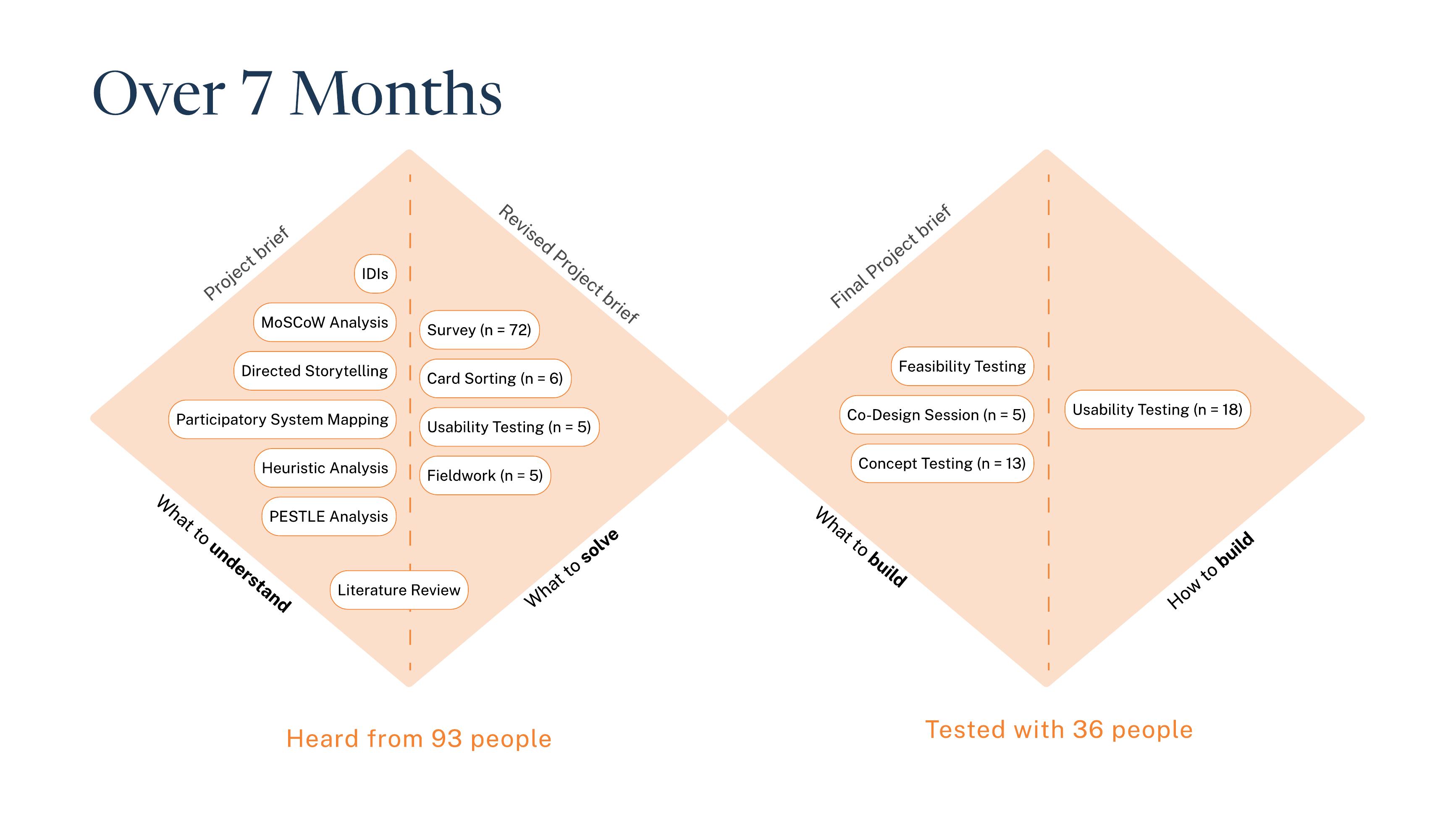
Research methods across the seven-month project, from discovery through prototype testing.
Research activities from kickoff to prototype testing.
  1. 01

    Kickoff

    Mapping how NSR's help reached clients

    • System mapping
    • Directed storytelling with NSR
    Why
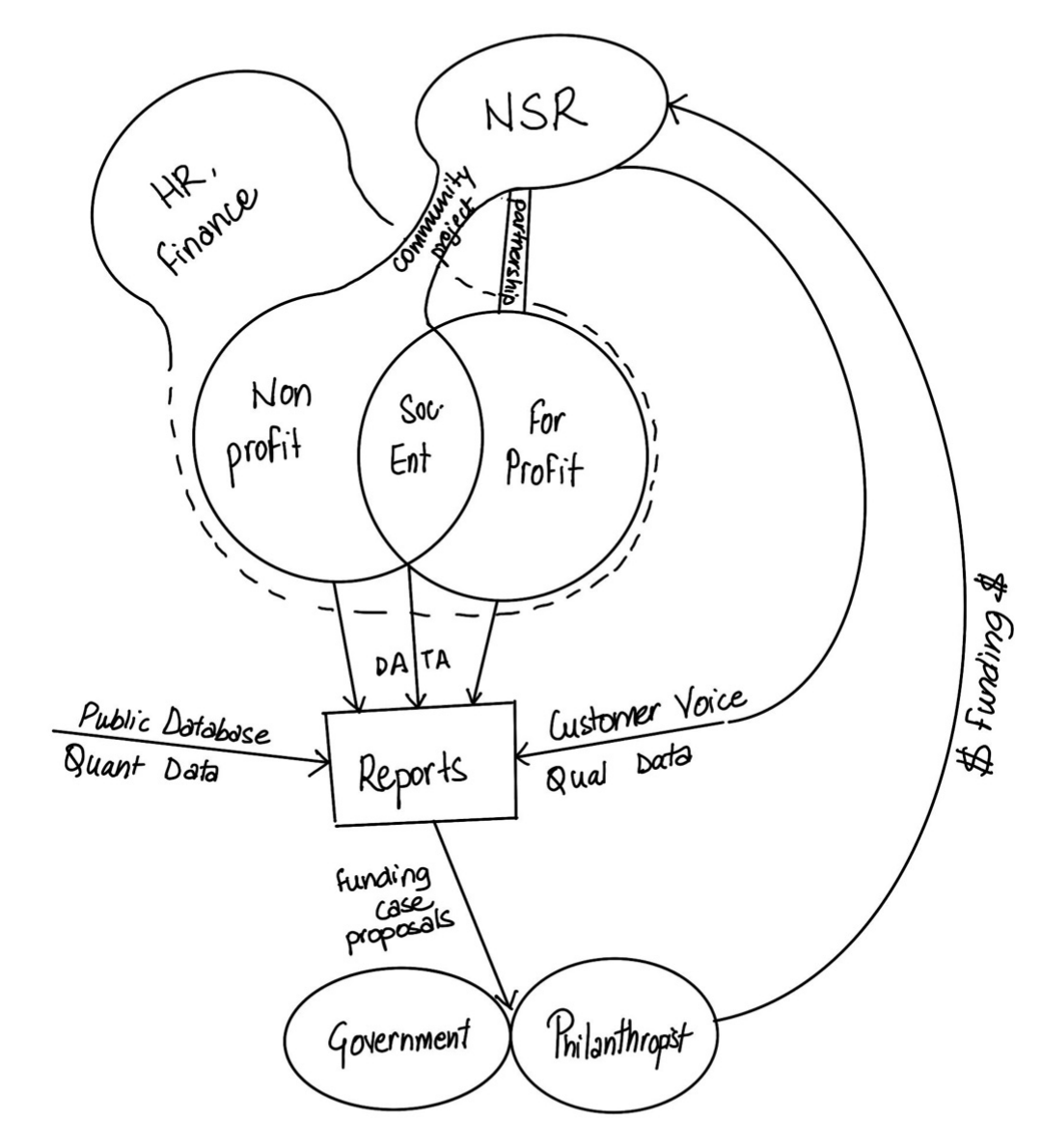
    NSR's request was open-ended. Before choosing where AI could help, we needed to see how support moved between NSR, its clients, public data, and funders.
    What we learned
    Reports and funding proposals drew on clients' own records, public data, and community accounts. NSR staff already helped clients bring these together, one client at a time.
    What we did with it
    We looked for ways AI could extend help NSR already gave, so the product would fit work staff knew how to support.
    Original kickoff system map linking NSR, community organizations, reports, public data, community voice, and funders.
  2. 02

    Discovery

    Understanding leaders' work inside and outside NSR

    • 8 interviews with non-NSR leaders
    • Fieldwork with 5 NSR clients
    • Survey
    What we wanted to find out
    How nonprofit leaders worked, where they needed help, and how the people they serve understood local data.
    What we did and why
    • Interviews with 8 leaders outside NSR. NSR wanted to support more leaders than its current clients, so we asked leaders it didn't yet work with about their day-to-day work and the help they needed.
    • Fieldwork with 5 NSR clients. NSR could introduce us to its own clients, so we could see in person how they worked and used NSR's services, beyond what they would describe in an interview.
    • A survey of 72 community members. Community members are the people these organizations serve. A survey let us hear from many of them about how they understood and used community data, so the research covered every part of the ecosystem.
    What we learned
    Leaders searched for grants while running their programs, and struggled to use community statistics in applications. In the survey, 51% found community data hard to understand and 35% were unsure how to act on it.
    What we did with it
    NSR chose making community data usable as the direction for the spring. Rebuilding its whole data portal was out of scope, so we looked at where the data was needed most: funding.
  3. 03

    Divergent prototypes & co-design

    Testing several directions before committing

    • 9 prototypes · 18 participants
    • 20 concepts · 5 participants
    What we wanted to find out
    Grant support, collaboration, financial management, and community data were all plausible directions. We needed to know which one to commit to, and what kind of help people wanted within it.
    What we did and why
    • 9 divergent prototypes with 18 participants. Quick prototypes gave people across stakeholder groups something concrete to react to, so we could compare directions side by side before investing in one.
    • Co-design with 5 participants. Three NSR clients, a board member, and a collaborating stakeholder worked through 20 concepts covering four kinds of support and five ways of delivering it. This showed which problem mattered most to them and how they wanted to be helped.
    What we learned
    Grant support received the strongest endorsement: 12.5 of 25 points, against 4.5 for budgeting. Participants preferred trusted introductions to automated networking. Clients wanted to learn to write applications themselves.
    What we did with it
    Grant applications became the center of the product, with finding grants before and reporting after. AI would coach clients and explain data, and clients would write and decide. We dropped automated networking and treated budgeting as supporting infrastructure.

The grant process

What applying for a grant involves

Leaders first find a grant their organization qualifies for, then prepare an application explaining their program and funding needs. After receiving funding, they report what they delivered.

Where to use AI, and where not

Powering everything with AI is expensive. So how do we decide the best use?

  1. Find a suitable grant

    No AI · rule-based ranking

    The recommendation algorithm ranked grants against 13 criteria, including mission, location, deadlines, matching funds, and reimbursement requirements.

    Why not AI

    A model call here would have made ranking less reliable: the same grant could rank differently from one run to the next, with no clear reason why.

    Fixed weights also meant the team could check and adjust them.

  2. Make a case for funding

    AI · explaining community data

    NSR's local census figures and neighborhood indicators could support an application. Clients needed to know which figures related to their program.

    Why AI

    The explanation has to be personal to be useful: it depends on the client's program and the grant they're applying for.

    AI suggested relevant figures and explained how to use them, with sources available to check.

  3. Report what was delivered

    AI · chatbot for follow-up

    Grant reports needed details about activities, attendance, and outcomes. A client's answer could be incomplete or the requested information unavailable.

    Why AI

    A survey can't follow up on an incomplete answer. A chatbot can ask follow-ups based on what the client has shared, which made this an opportunity to explore it for data collection.

    Clients would review what it collected.

Data collection

A chatbot to collect report data

NSR already collected program information through impact surveys, but answers often came back without enough detail to use in a report. A survey records an answer and cannot probe it. Staff then had to follow up by phone or in interviews, and a small team could not do that for every client.

That follow-up work gave us a specific reason to use AI. We designed a chatbot that asks the survey's questions, then follows up on an incomplete answer while the client is still responding. If a client wrote “we ran several workshops,” it could ask how many, who attended, and what records they kept.

Survey

Clients answer on their own time.

Cannot ask about a vague or missing answer.

Our choice

Chatbot

Clients answer on their own time, and it asks follow-ups when an answer is incomplete.

Clients review and approve what it collected.

Staff interview

Staff can probe for missing details.

Takes staff time NSR could not give every client.

  • Probe the answerAsk a relevant follow-up when a response is vague or incomplete.
  • Allow “I don't know”Leave a gap when no reliable information is available.
  • Keep sources visibleShow which records and public data each detail came from.
  • Review before useThe client checks and corrects the information, including estimates, before it goes into a report.
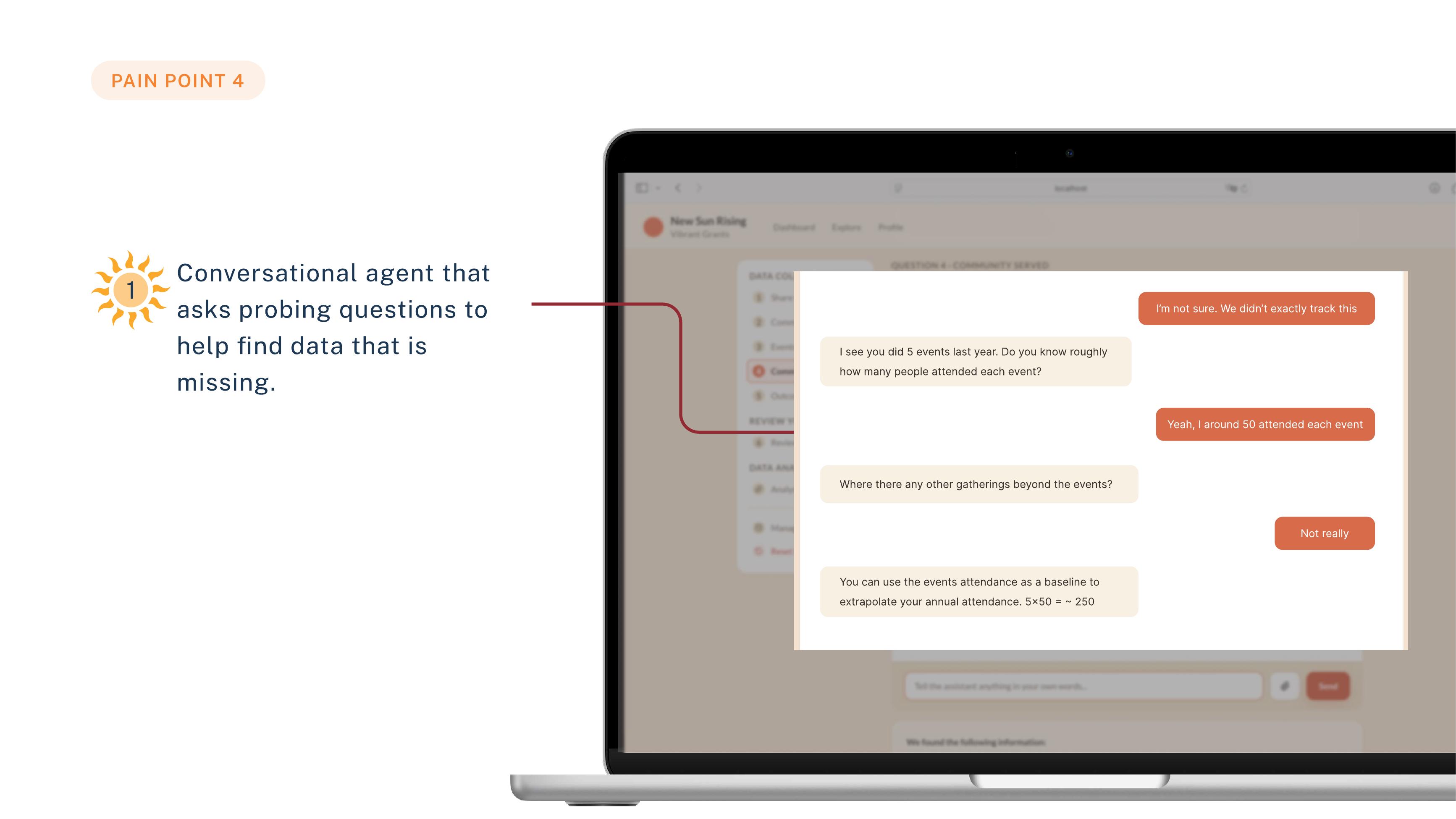
Reporting prototype in which the assistant asks how many people attended each of five events, then suggests estimating annual attendance from those numbers.
Prototype conversation: the client says attendance wasn't tracked, and the assistant works from the five recorded events to an estimate.

In the full prototype, the assistant combines existing survey records with details from the conversation. Clients approve the new details before they are used.

The reporting assistant in the prototype

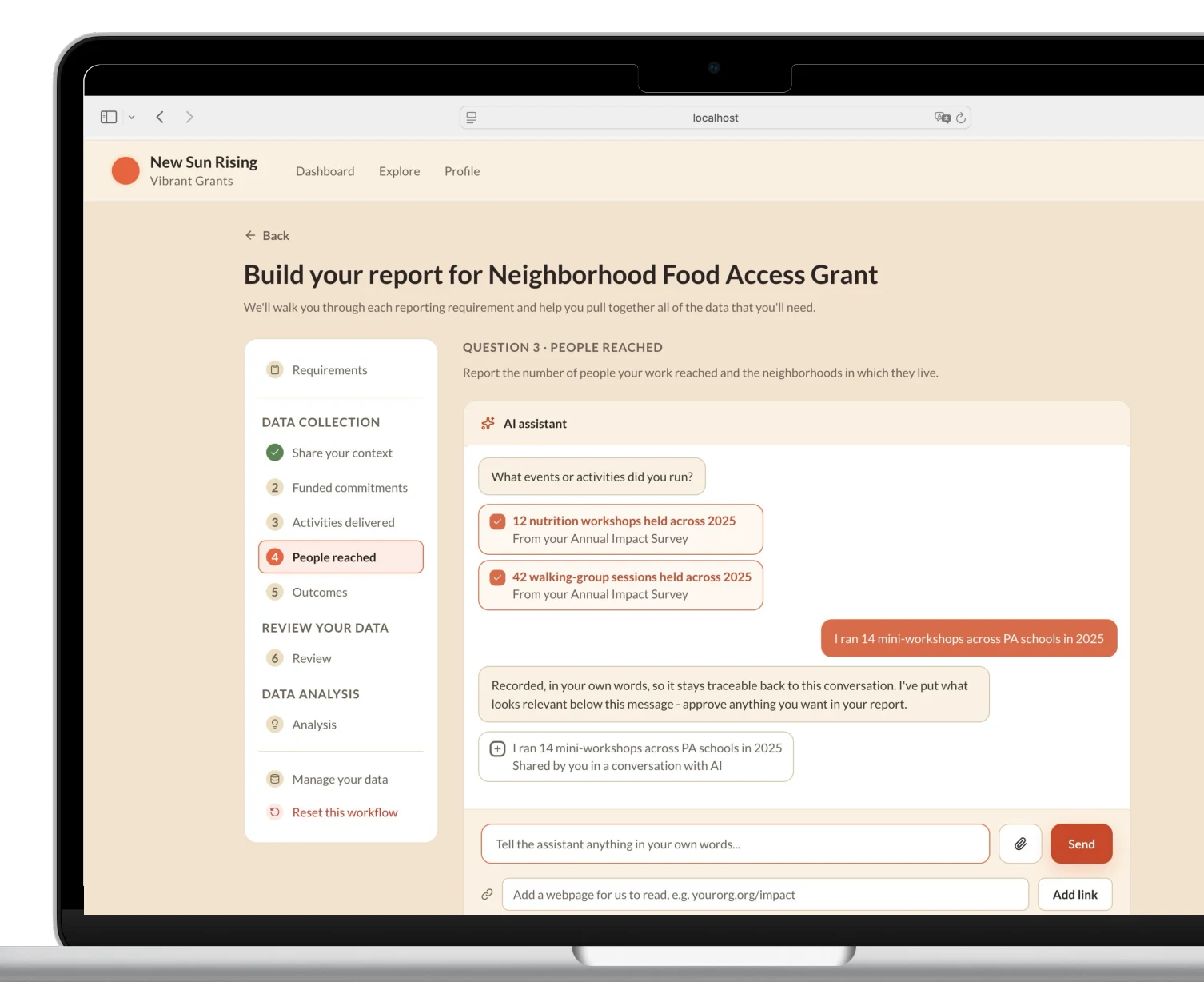
Reporting prototype showing source-labelled annual-survey records and a separate conversation item awaiting client approval.
  1. 1

    Reuse existing records

    The annual impact survey is identified beneath each imported item.

  2. 2

    Approve conversation details

    New information is labelled separately and waits for the client's approval.

  3. 3

    Review before analysis

    The left-hand steps include a review stage before the data is used for analysis.

The assistant asks about program activities, brings in annual-survey records, and offers conversation details for the client to approve. Open the full screen to inspect the reporting flow.Mobile view shows the source and approval detail. The full screen also shows the review stage.

AI evaluation

Evaluating the chatbot

We turned AI-dependent tasks from four prototypes into 18 test scenarios. I defined what the assistant needed to do in each case, ran each scenario five times, and graded the responses against those expectations.

Tested on Gemini 3.5 Flash · May–June 2026

Scenarios covered

Records
Extract named fields, combine agreeing information, and identify gaps without inventing values.
Conflicts
Identify contradictory records and ask for clarification before continuing.
Sources
Attach the correct source and section to each claim.
Interpretation
Explain relevant community data and assess an individual grant against supplied criteria.
Writing
Use grant-appropriate language without adding specifics or overstating claims.
Conversation
Ask useful follow-ups, handle unavailable answers, respect requests to skip, and confirm before replacing work.
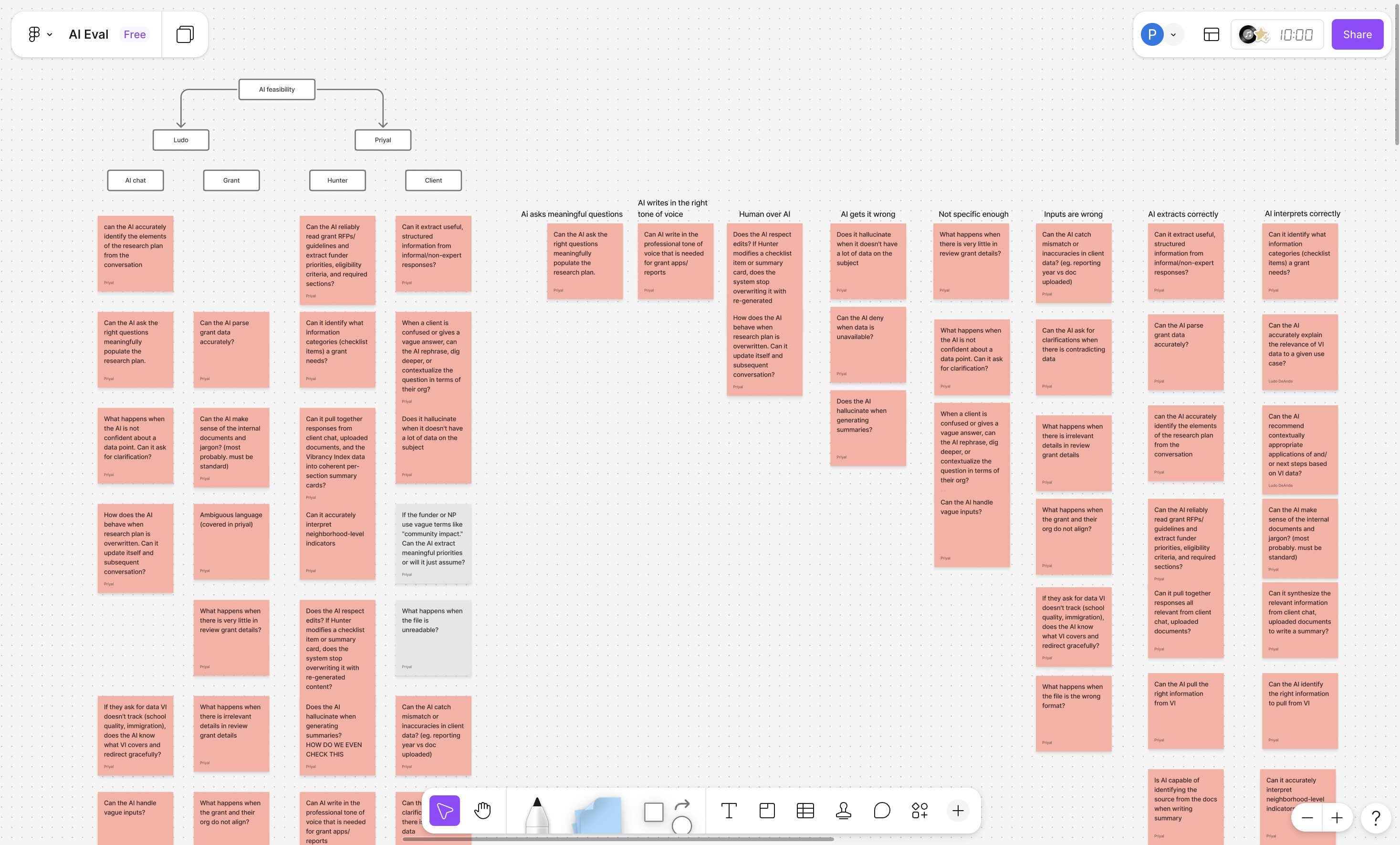
FigJam board of sticky notes: questions about each prototype's AI tasks, regrouped under behaviors such as asking meaningful questions, writing in the right tone, extracting correctly, and handling wrong or vague inputs.
Our FigJam board: questions about each prototype's AI tasks, regrouped into the behaviors we tested.

The model handled field extraction, citations, and several difficult client replies well. Failures helped us decide what to change in the system prompt and what to address in the UX.

Example of a failure

The reporting assistant needed a stopping point

We wanted reporting to feel seamless, so the chatbot moved the client through the reporting sections on its own as it collected information. In an additional conversation check, we found it couldn't end a conversation, even after it had all the information it needed. The client had no clear way to finish.

Observed: follow-ups continued

Required reporting information collectedMore questions

Prototype change: client controls progress

Assistant signals enough informationClient chooses to move ahead

So we handed that decision to the client. The chatbot now tells them when the information is sufficient, and they mark the section complete and move forward.

Testing with clients

Evaluating with clients

  1. Think-aloud sessions

    • 5 NSR clients + 2 other nonprofit leaders
    Why
    The model evaluation showed how the assistant behaved on its own. We also needed to see how clients worked with it: whether they understood what it gave them, trusted it, and could check it.
    What we did
    Clients worked through the prototype's step-by-step and dashboard views and talked through what they were thinking as they went.
    What we learned
    Looking at imported data, one client asked, “Are they pulling, or just suggesting?” The same client struggled with a regional peer average that had no source. That is why every imported item got a source label, details from the conversation waited for the client's approval, and a review step came before analysis. Clients also differed on guidance: one wanted a simpler step-by-step flow, another preferred the denser dashboard, which pointed us toward offering more than one level of guidance.
Delivery & next steps

NSR secured a grant to implement the work

Delivered at the end of the capstone

  • Working application and coded grant ranking
  • Grant-ingestion pipeline and seven AI integrations
  • Prototype source labels, approvals, and client move-ahead controls

Remaining implementation and testing

  • Connect production data and calibrate ranking with real grants
  • Test the prompts and reporting flow with realistic data
  • Pilot the complete application with clients
Seven people from the project standing together indoors in front of a wall of plants.
The team.

Looking back

Learnings

Evaluating a model turned out to be different from testing an interface. A screen behaves the same way for every participant. The same prompt can return a different response each time, so one good answer showed only that the model could do a task once. That is why we ran each scenario five times.

It also changed what I graded. There was rarely a single correct response to compare against, so I wrote down the behaviors each scenario needed: keep sources intact, leave a gap when information was missing, ask a useful follow-up, and help the client finish. A response could be worded many ways and still be judged against those.

Some failures only showed up across a whole conversation. In the stopping case, each question was reasonable on its own; the problem was that the questions kept coming. We had the assistant say when it had enough information and gave clients a control to move ahead, so finishing didn't depend on the model deciding when to stop.